 Oh-My-Note
ESLint 前端工作流
前置工作
涉及到的 npm 模块
- eslint —— 用来检查代码规范性
- prettier —— 用来格式化代码
- stylelint —— 用来检查 css
- husky —— git 的钩子,在 git 的 hook 中执行一些命令
- lint-staged —— 对 git 暂存的文件进行 lint 检查
前置工作
-
手动安装三个 vscode 插件:
-
ESLint —— 配合编辑器检查,有报错提醒功能
-
StyleLint —— 配合编辑器格式化 css
-
Prettier - Code formatter —— 配合编辑器格式化代码
-
-
用
vite起一个支持TS的React项目模板
bash1npm create vite@latest workflow-template --template react-ts
2npm install
配置 eslint
安装 eslint 依赖:
bash1npm install eslint --save-dev
2eslint --init
我们的思路是用 eslint 帮助我们检查语法,找到不符合规范的代码。所以这里选择第二个选项:

其他选择根据实际情况一路选择下去即可。
然后会自动生成.eslintrc的文件,我这里选择的是json方式,生成的 JSON 内容是这样的:
js1{
2    "env": {
3        "browser": true,
4        "es2021": true
5    },
6    "extends": [
7        "eslint:recommended",
8        "plugin:react/recommended",
9        "plugin:@typescript-eslint/recommended"
10    ],
11    "parser": "@typescript-eslint/parser",
12    "parserOptions": {
13        "ecmaFeatures": {
14            "jsx": true
15        },
16        "ecmaVersion": 12,
17        "sourceType": "module"
18    },
19    "plugins": [
20        "react",
21        "@typescript-eslint"
22    ],
23    "rules": {
24    }
25}
配置 eslint 规则
-
react-in-jsx-scope
json1  "rules": {
2    "react/react-in-jsx-scope": "off",
3  }
由于
plugin:react/recommended会强制提示所有 React 组件都需要引入 React,比如每个tsx文件都需要这样写一遍:js1import React from 'react'否则会报错
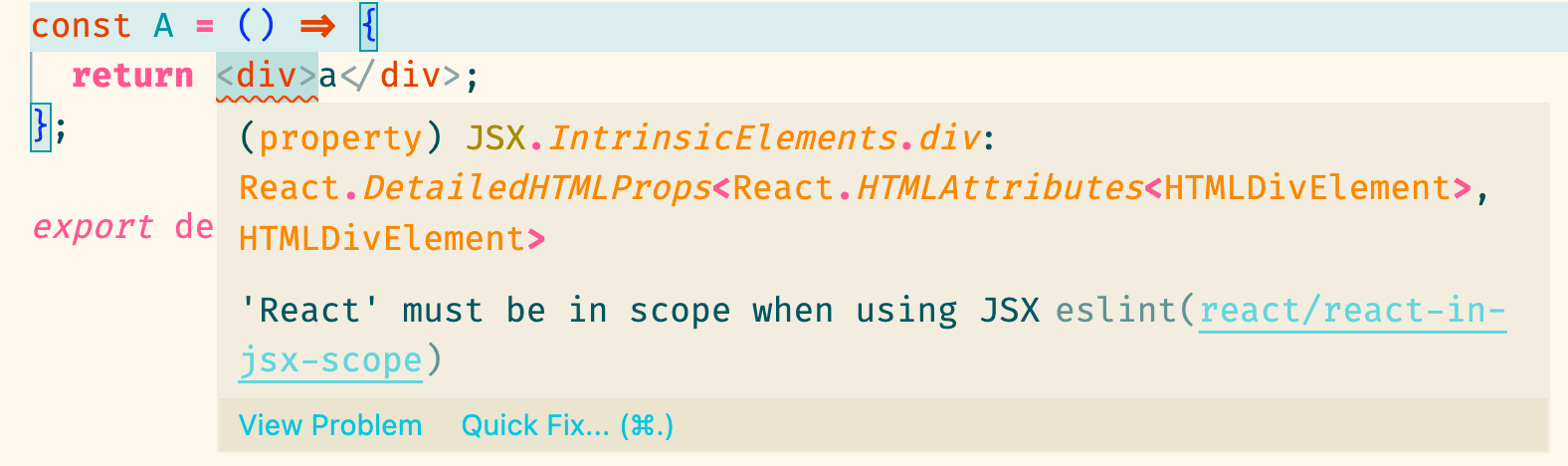
如果不需要这样的默认规则,则用上面的选项禁用掉。
-
json
1"no-console": "error"顾名思义就是有 console 就会报错,配合 ESLint 插件能马上得到提示
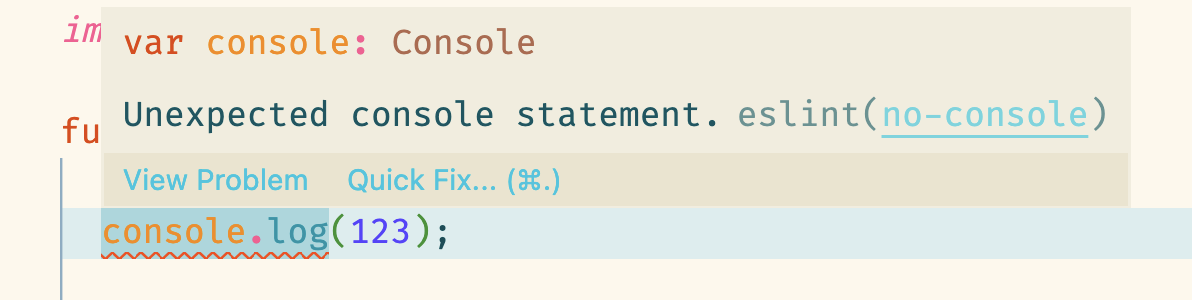
-
json
1"eqeqeq": "error"要求使用
===和!== -
该规则允许你指定你不想使用的 import。
json1    "no-restricted-imports": [
2      "error",
3      {
4        "patterns": ["./*", "../*"]
5      }
6    ]
比如上面的配置方式是不想用相对路径来引入,那写相对路径就会报错
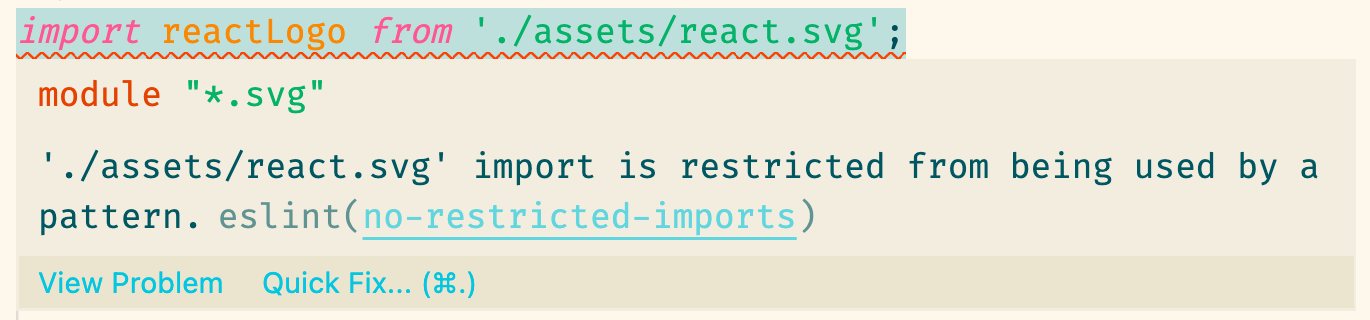
-
unused-imports/no-unused-imports
这个规则是用来对
import了但没有使用的依赖进行报错的。该规则需要额外安装插件eslint-plugin-unused-imports
bash1npm install eslint-plugin-unused-imports --save-dev然后添加到
plugins中js1 "plugins": ["react", "@typescript-eslint", "unused-imports"],最后添加规则:
json1 "unused-imports/no-unused-imports": "error" -
import/order
eslint-plugin-import这个插件可以用来对import引入的代码进行排序bash1npm install --save-dev eslint-plugin-importjson1 "plugins": [ 2 "import", 3 ],json1 "import/order": [ 2 "error", 3 { 4 "alphabetize": { 5 "order": "asc" 6 } 7 } 8 ] -
其他规则
已经有很多默认规则是被
eslint:recommended这个扩展内置了的,详情看eslint 中文官网,内置的规则都已经被标记 ✅。剩下缺少什么自己添加即可。
在 Package.json 中添加 lint 命令:
  "scripts": {
    "lint": "eslint src --ext .js,.ts,.jsx,.tsx --fix",
  },
eslint src指定检查当前项目中src目录下的文件- *
--ext为指定 lint 哪些后缀的文件 --fix开启自动修复
执行npm run lint即可检查代码
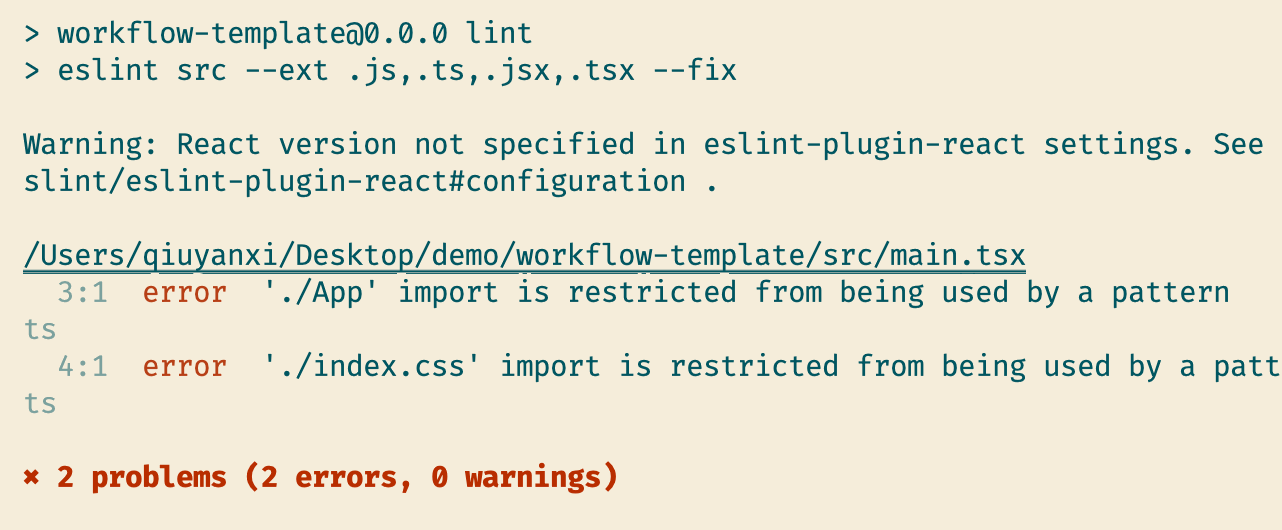
如果在 vscode 有下载 ESLint 这个插件,那么不需要执行命令,编辑器也能够报告错误

同时,需要在 Code > Preferences > Settings 中加入以下配置
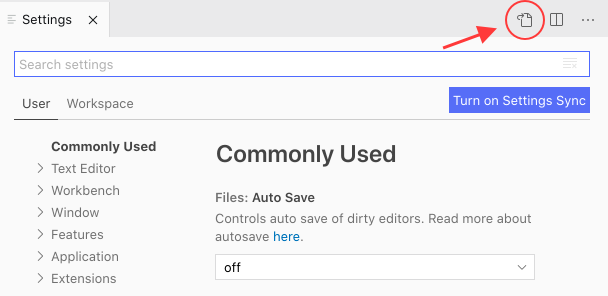
json1{
2  // ...
3  "eslint.format.enable": true,
4  "editor.codeActionsOnSave": {
5    "source.fixAll.eslint": true
6  }
7}
第一个是允许用 eslint 的格式化,下一个是保存时会自动修复错误代码(比如import { xxx } 后没用到的 xxx 引入会被删除)
配置 prettier
bash1npm install --save-dev eslint-config-prettier
2npm install --save-dev eslint-plugin-prettier
3npm install --save-dev --save-exact prettier
在.eslintrc.json中加入以下内容:
js1{
2  "plugins": ["prettier"],
3  "extends": ["plugin:prettier/recommended"],
4  "rules": {
5    "prettier/prettier": "error"
6  }
7}
需要解释一下的是eslint与prettier会有格式化的差异,所以需要额外加上eslint-config-prettier来禁用所有与格式化相关的 ESLint 规则。
这一点在eslint-plugin-prettier的 README 上有提到。
接着,创建一个空的.prettierrc.json文件,根据要求写上格式化样式的配置,举例一下:
json1{
2  "trailingComma": "all",
3  "bracketSpacing": true,
4  "arrowParens": "always",
5  "printWidth": 120,
6  "singleQuote": true,
7  "semi": false
8}
除此之外,还可以把这个配置写到.eslintrc的rules中:
json1  "rules": {
2  	"prettier/prettier": [
3   	 "error",
4   	 {
5    	  "singleQuote": true,
6    	  ...
7   	 }
8  	]
9	}
这个规则将合并和覆盖配置的.pretierrc 文件,建议单独创建.pretierrc 文件
然后在 Package.json 中添加以下脚本命令:
json1  "scripts": {
2    "format": "prettier --write \"src/**/*.{html,ts,js,json,jsx,tsx}\""
3  },
这时候执行npm run format就能够通过脚本命令格式化 src 目录下所有匹配得上扩展名的文件。
我们安装的 vscode 插件
Prettier - Code formatter也会根据.prettierrc.json的配置自动格式化。
配置 styleLint
styleLint可格式化 css 代码,检查 css 语法错误与不合理的写法,指定 css 书写顺序等。
bash1npm install --save-dev stylelint stylelint-config-standard stylelint-config-prettier postcss-less
说明:
-
stylelint —— css 的 lint 工具
-
stylelint-config-standard —— 官方内置一些标准规则,搭配 extends 使用
-
stylelint-config-prettier —— 抹平与 prettier 的格式化冲突问题,搭配 extends 使用
请注意,如果 Stylelint 版本在 15 或以上,则不再需要这个插件。因为 prettier 的格式化一定程度上做成了规范,所以 Stylelint 决定放弃对代码格式的 lint,v15 版本的 Stylelint 已经删除了跟格式相关的 lint 规则,我们只需要使用 prettier 格式化代码即可。
详情见:https://stylelint.io/migration-guide/to-15/#deprecated-stylistic-rules
-
postcss-less —— 当 lint 非 css 代码时,需要用到额外的 syntax 插件识别,这里以 less 代码为例,其他的插件可以看官网
创建.stylelintrc.json文件,内容这样写:
json1{
2  "extends": ["stylelint-config-standard", "stylelint-config-prettier"],
3  "customSyntax": "postcss-less"
4}
现在配合 vscode 的 StyleLint 插件已经能够实现报错提示了:
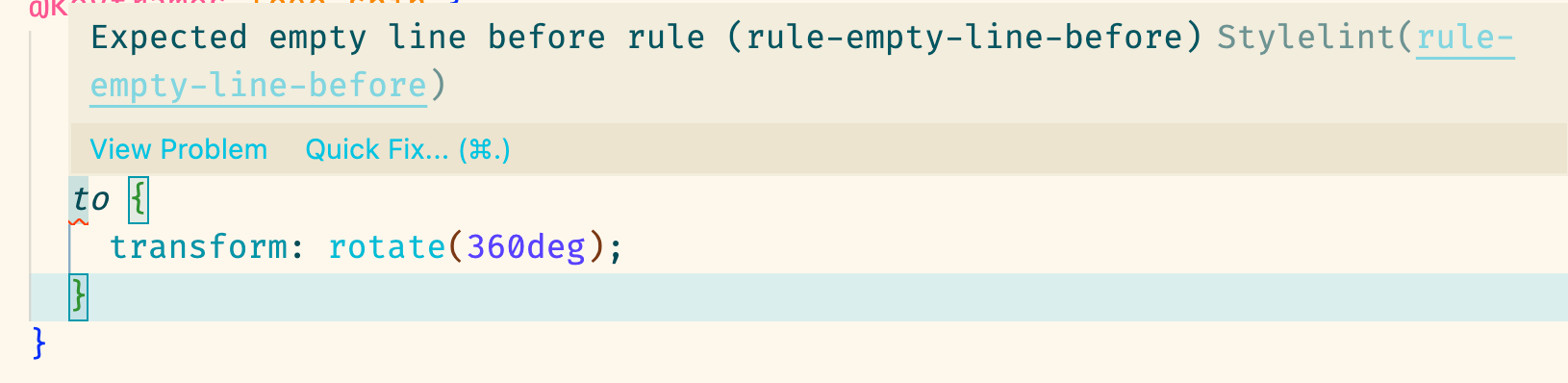
最后在 Package.json 中添加以下脚本命令:
json1  "scripts": {
2    "lint:style": "stylelint \"**/*.{css,less}\" --fix"
3  },
其中--fix在执行npm run lint:style时会将一些不正确的格式自动修复成正确的格式。
顺便在 Code > Preferences > Settings 中加入以下配置
diff1  "editor.codeActionsOnSave": {
2    "source.fixAll.eslint": true,
3+   "source.fixAll.stylelint": true
4  },
这样在 vscode 中保存文件时就可以用 stylelint 修复错误的代码。
配置 husky
我们需要引入强制的手段来保证提交到git仓库的代码是符合我们的要求的。husky是一个用来管理git hook的工具,git hook即在我们使用git提交代码的过程中会触发的钩子。
简单来说,我们需要用 husky 安装 pre-commit钩子,这样就可以在git commit之前运行脚本来检测提交的代码是否规范并且格式化不规范的代码。
安装
bash1npm install --save-dev husky
安装之后还需要执行以下命令安装钩子
bash1husky install
但是拉取我们项目的其他同事可不一定会这样执行一次。这时候我们需要用npm scripts的钩子:prepare
json1  "scripts": {
2    "prepare": "husky install",
3  }
为了测试这个钩子,我们现将原来下载过得node_modules文件夹删除
bash1rm -rf node_modules
然后重新安装一遍:
bash1npm i
不出意外的话,当所有包都``install后,会触发prepare脚本,这时就会自动执行husky install`命令啦
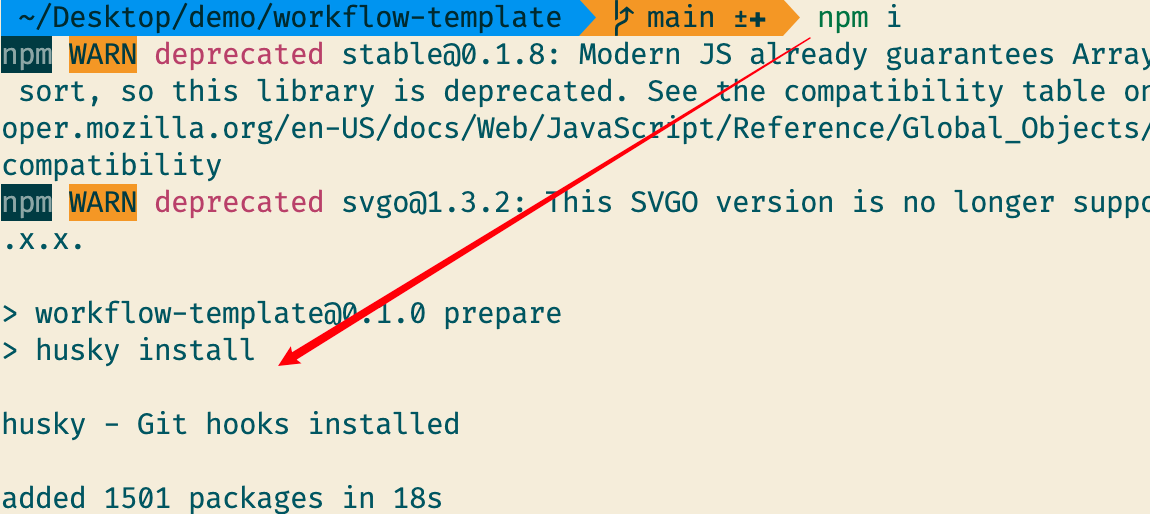
执行后我们会得到.husky目录
接下来我们就为 git 仓库添加一个pre-commit钩子
bash1npx husky add .husky/pre-commit "npm run format && npm run lint:style && npm run lint"
- npx husky —— 运行 husky
- add .husky/pre-commit —— 添加一个 pre-commit 钩子
- npm run format && npm run lint:style && npm run lint —— 先
format代码然后用 eslint 检查
这样在我们提交前就会对全部代码进行格式化和检查。
通过分析我们发现,commit 前应该只需 lint 暂存区的代码即可。
如果写 TypeScript。最好能仅格式化暂存区的代码,但 lint 检查所有代码,原因是修改了类型文件后可能会影响到其他未修改的文件,这时候不检查所有代码则很难发现这个问题
那么该如何只对 git 暂存区的代码进行 lint 呢?需要用到lint staged
配置 lint-staged
安装
bash1npm i --save-dev lint-staged
在 package.json 中配置
diff1  "scripts": {
2    "prepare": "husky install",
3     "lint": "eslint src --ext .js,.ts,.jsx,.tsx --fix",
4-    "format": "prettier --write \"src/**/*.{html,ts,js,json,jsx,tsx}\"",
5-    "lint:style": "stylelint \"**/*.{css,less}\" --fix",
6+    "format": "prettier --write --ignore-unknown",
7+    "lint:style": "stylelint --fix"
8+  },
9+  "lint-staged": {
10+    "*.{css,less}": [
11+      "npm run lint:style"
12+    ],
13+    "**/*": [
14+      "npm run format"
15+    ]
16  },
17
将.husky下的pre-commit文件的指令修改为:
npx --no-install lint-staged && npm run lint。
这样子做就可以在提交前先 format 一遍在暂存区的代码,然后对所有的 src 下的代码 lint 一遍,以免修改了某个基类型后影响到未修改过的文件而没有发现。(TypeScript 开发很容易遇到这个问题)
总结
-
通过 eslint 完成对规则的限制
-
通过 prettier 完成对格式化定义,以及使用
eslint-config-prettier抹平与 eslint 自带格式化的冲突问题 -
通过 stylelint 完成对 css 的检查和格式化,以及使用
stylelint-config-prettier抹平与 prettier 格式化的冲突问题 -
通过 husky 添加 pre-commit 钩子,这里还用的 scripts 的一个钩子 —— prepare 用来执行 husky install
-
通过 lint-staged 完成只对暂存区代码的校验和格式化工作
-
搭配 VSCode 的插件
StyleLint和ESLint以及Prettier - Code formatter使用加强提示和自动格式化功能 -
setting.json 中添加三条允许自动 fix 的属性:
json1{
2  // ...
3  "eslint.format.enable": true,
4  "editor.codeActionsOnSave": {
5    "source.fixAll.eslint": true,
6    "source.fixAll.stylelint": true
7  }
8}
最终配置
.eslintrc.json
json1{
2  "env": {
3    "browser": true,
4    "es2021": true,
5    "node": true
6  },
7  "extends": [
8    "eslint:recommended",
9    "plugin:react/recommended",
10    "plugin:@typescript-eslint/recommended",
11    "plugin:prettier/recommended"
12  ],
13  "parser": "@typescript-eslint/parser",
14  "parserOptions": {
15    "ecmaFeatures": {
16      "jsx": true
17    },
18    "ecmaVersion": 12,
19    "sourceType": "module"
20  },
21  "plugins": ["react", "@typescript-eslint", "prettier", "unused-imports", "import"],
22  "rules": {
23    "react/react-in-jsx-scope": "off",
24    "no-console": "error",
25    "eqeqeq": "error",
26    "unused-imports/no-unused-imports": "error",
27    "no-restricted-imports": [
28      "error",
29      {
30        "patterns": ["./*", "../*"]
31      }
32    ],
33    "import/order": [
34      "error",
35      {
36        "alphabetize": {
37          "order": "asc"
38        }
39      }
40    ],
41    "prettier/prettier": "error"
42  }
43}
.prettierrc.json
json1{
2  "trailingComma": "all",
3  "bracketSpacing": true,
4  "arrowParens": "always",
5  "printWidth": 120,
6  "singleQuote": true,
7  "semi": false
8}
.stylelintrc.json
json1{
2  "extends": ["stylelint-config-standard", "stylelint-config-prettier"],
3  "customSyntax": "postcss-less"
4}
package.json
json1  "scripts": {
2    "prepare": "husky install",
3    "lint": "eslint src --ext .js,.ts,.jsx,.tsx --fix",
4    "format": "prettier --write --ignore-unknown",
5    "lint:style": "stylelint --fix"
6  },
7  "lint-staged": {
8    "*.{css,less}": [
9      "npm run lint:style"
10    ],
11    "**/*": [
12      "npm run format"
13    ]
14  }