 Oh-My-Note
使用 Winston 记录日志
我们在本地开发时可以使用很多种方式查看日志:
console- nest 内置的 logger
- debug 断点输出
如果想要在生产环境中查看日志,那通过控制台查看那么多的 log 输出显然就不现实了。
我们需要一个除了能够在控制台看输出外,还能够把日志记录起来的工具。
winston 是 node 生态中比较好的日志框架,我们可以在 nest 中集成 winston 来记录日志。
日志功能显然是一个 App 通用的功能,因此,我们可以将其封装成一个独立的 Module 以提供给 App 的每个地方使用。
在此之前,请安装 winston :
bash1pnpm install winston
winston 主要用于断点,dayjs 主要用来格式化时间。
winston 的 api 很简单,只需要调用createLogger方法,就能够生成一个 logger。
至于 log 是输出在终端还是将内容存在数据库中,该功能则是通过transports属性配置的。
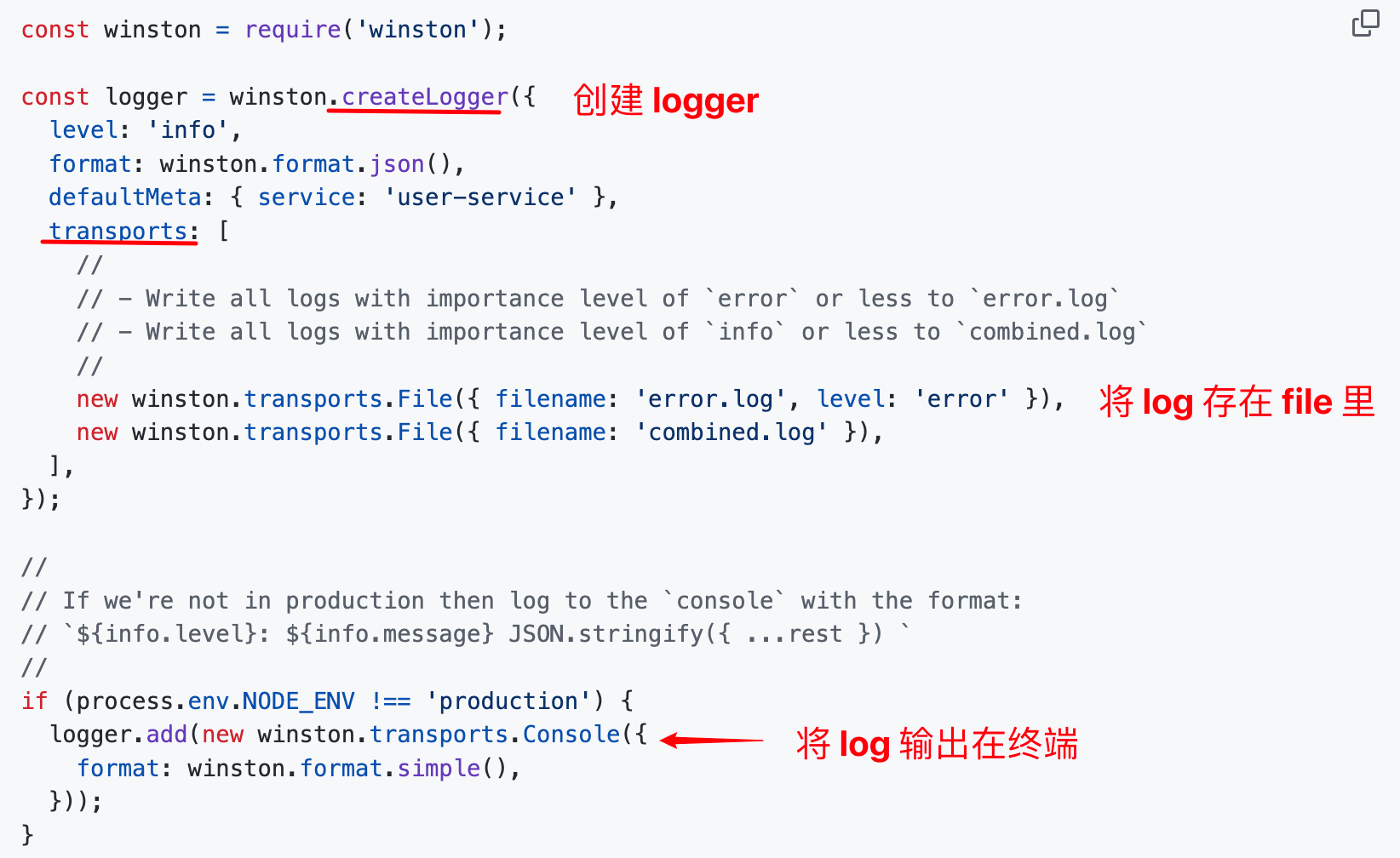
所以封装 winston module 的思路是在注册时由使用者提供创建 logger 的 options。
我们只需要包装一下 logger 的 实例方法即可。
-
实现
WinstonLoggerServicetypescript1import { Inject, Injectable, LoggerService } from '@nestjs/common' 2import * as winston from 'winston' 3import * as dayjs from 'dayjs' 4 5export const WINSTON_LOGGER_OPTIONS = 'WINSTON_LOGGER_OPTIONS' 6export const WINSTON_LOGGER_TOKEN = 'WINSTON_LOGGER_TOKEN' 7 8@Injectable() 9export class WinstonLoggerService implements LoggerService { 10 private readonly logger: winston.Logger 11 12 constructor( 13 @Inject(WINSTON_LOGGER_OPTIONS) 14 private options: winston.LoggerOptions, 15 ) { 16 this.logger = winston.createLogger(this.options) 17 } 18 19 log(message: string, context?: string) { 20 this.logger.log({ level: 'info', message, context }) 21 } 22 23 error(message: string | object, context?: string) { 24 this.logger.error({ level: 'error', message, context }) 25 } 26 27 warn(message: string | object, context?: string) { 28 this.logger.warn({ level: 'warn', message, context }) 29 } 30 31 debug(message: string | object, context?: string) { 32 this.logger.debug({ level: 'debug', message, context }) 33 } 34}上面的代码仅仅是注入
WINSTON_LOGGER_OPTIONS,创建一个 Logger,然后封装了一下 winston 的部分实例方法。LoggerService是默认的 nest Logger 的接口。WINSTON_LOGGER_OPTIONS是写入 winston Module 的 provider 的 token。 -
创建 winston 动态 module
bash1nest generate module winstonLogger --no-specWinstonLogger Module需要在 AppModule 中动态传入 option 。按照动态 module 的方法命名约定,该模块应当是只需注册一次而让每个模块都能使用,所以这里使用forRoot方法。typescript1import { DynamicModule, Global, Module } from '@nestjs/common' 2import { LoggerOptions } from 'winston' 3import { WINSTON_LOGGER_OPTIONS, WINSTON_LOGGER_TOKEN, WinstonLoggerService } from './winston-logger.service' 4 5@Global() 6@Module({}) 7export class WinstonLoggerModule { 8 public static forRoot(options: LoggerOptions): DynamicModule { 9 return { 10 module: WinstonLoggerModule, 11 providers: [ 12 { 13 provide: WINSTON_LOGGER_TOKEN, 14 useClass: WinstonLoggerService, 15 }, 16 { 17 provide: WINSTON_LOGGER_OPTIONS, 18 useValue: options, 19 }, 20 ], 21 exports: [WINSTON_LOGGER_TOKEN, WINSTON_LOGGER_OPTIONS], 22 } 23 } 24}- 当调用
forRoot方法时,WINSTON_LOGGER_OPTIONS也就有了固定值。 WINSTON_LOGGER_TOKEN是用来给其他模块注入 Service 依赖的 token。@Global()装饰器让该模块成为全局的模块。
- 当调用
-
使用 module
在 AppModule 中调用 forRoot 方法:
typescript1import { Module } from '@nestjs/common'
2import { AppController } from './app.controller'
3import { AppService } from './app.service'
4import { WinstonLoggerModule } from './winston-logger/winston-logger.module'
5import { UserModule } from './user/user.module'
6import * as winston from 'winston'
7import 'winston-daily-rotate-file'
8import * as chalk from 'chalk'
9import * as dayjs from 'dayjs'
10@Module({
11  imports: [
12    WinstonLoggerModule.forRoot({
13      level: 'debug',
14      transports: [
15        new winston.transports.Console({
16          format: winston.format.combine(
17            winston.format.colorize(),
18            winston.format.printf(({ context, level, message }) => {
19              const time = dayjs(Date.now()).format('YYYY-MM-DD HH:mm:ss')
20              const appStr = chalk.green(`[Nest]`)
21              const contextStr = chalk.yellow(`[${context}]`)
22              return `${appStr} ${time} ${level} ${contextStr} ${message} `
23            }),
24          ),
25        }),
26
27        new winston.transports.DailyRotateFile({
28          level: 'debug',
29          dirname: 'logs',
30          filename: '%DATE%.log',
31          datePattern: 'YYYY-MM-DD',
32          format: winston.format.combine(winston.format.timestamp(), winston.format.json()),
33        }),
34      ],
35    }),
36    UserModule,
37  ],
38  controllers: [AppController],
39  providers: [AppService],
40})
41export class AppModule {}
调用 forRoot 方法后,这里使用了两个 transport:
- Console: 用于在终端输出。
- DailyRotateFile:将 log 内容存储在 file 内,该 file 采用时间命名规则。
还需要额外安装三个包:
bash1pnpm install chalk winston-daily-rotate-file dayjs创建一个 User Module 测试一下。
bash1nest generate module user代码如下:
typescript1import { Module } from '@nestjs/common'
2import { UserController } from './user.controller'
3
4@Module({
5  controllers: [UserController],
6})
7export class UserModule {}
接着创建
UserController并注入WinstonLoggerService。typescript1import { Controller, Get, Inject } from '@nestjs/common' 2import { WINSTON_LOGGER_TOKEN, WinstonLoggerService } from 'src/winston-logger/winston-logger.service' 3 4@Controller() 5export class UserController { 6 constructor( 7 @Inject(WINSTON_LOGGER_TOKEN) 8 private readonly logger: WinstonLoggerService, 9 ) {} 10 11 @Get('/user') 12 getUser() { 13 this.logger.log({ name: 'John', age: 20 }, 'UserController') 14 return { name: 'John', age: 20 } 15 } 16}访问
http://localhost:3000/user测试一下: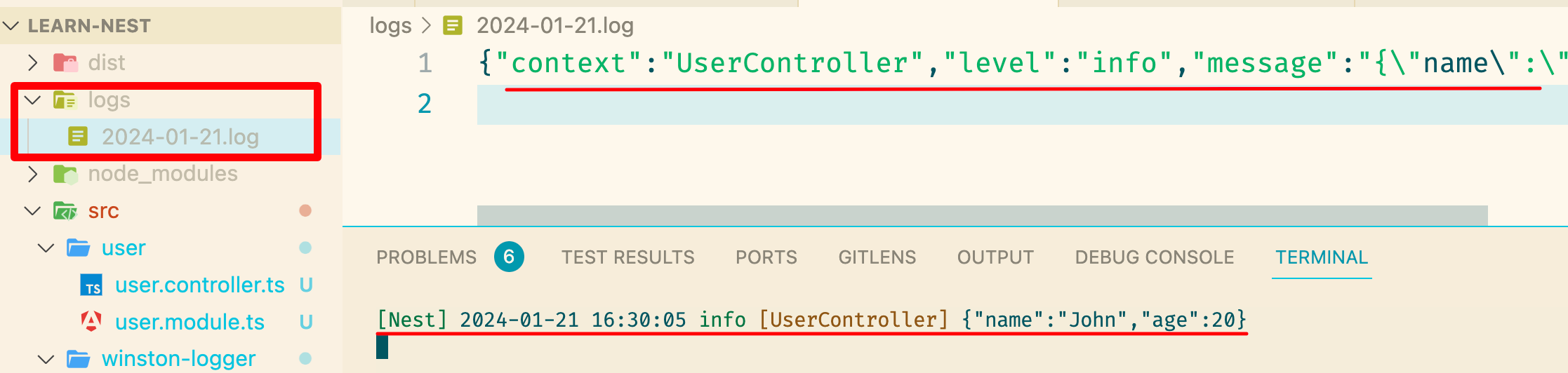
DailyRotateFile 将信息写入了文件当中。
Console 将信息打印到了终端中。
总结
nest 提供了内置的 logger API,比 console.log 强大,不仅可以控制输出的日志级别,还可以根据环境禁用日志打印。
如果对内置的 logger 不满意,还可以自己实现一套,把 nest 提供的 logger 给覆盖掉。
但是默认的日志功能只能在终端查看,如果放到线上 debug 会非常不方便。
一般会选择日志框架来记录日志内容,方便后期排查问题。
winston 就是 node 生态中用户量比较大的日志框架。
为了方便在 Nest 中使用,这里按照 nest-winton 的设计封装了一个基础的全局 Module。