 Oh-My-Note
第十六章 状态模式
状态模式的关键是区分事物内部的状态,事物内部状态的改变往往会带来事物的行为改变。
16.1 初识状态模式
我们来想象这样一个场景:当电灯开着的时候,此时按下开关,电灯会切换到关闭状态。当电灯关闭的时候,此时按下开关,电灯又被打开。同一个开关,在不同的状态下,表现出来的行为是不一样的。
下面我们用传统面向对象的方式来用代码描述上面的场景。
- 首先我们需要定义一个 Light 类,电灯对象是被 Light 类创建出来的。
- 电灯对象有两种个属性:state 表示电灯此时的状态,button 属性可以控制 state 状态。
js1class Light {
2  constructor() {
3    this.state = 'off' //默认状态关闭
4    this.button = null //电灯的开关
5  }
6}
这个电灯对象有一个 init 方法,该方法负责在页面中创建一个 button 节点,假设这个 button 就是电灯的开关按钮,当 button 的 onclick 被触发,就是电灯开关被按下的时候。
js1class Light {
2  constructor() {
3    this.state = 'off' //默认状态关闭
4    this.button = null //电灯的开关
5  }
6  init() {
7    const button = document.createElement('button')
8    self = this
9    button.innerHTML = '开关'
10    this.button = document.body.appendChild(button)
11    this.button.onclick = self.buttonWasPressed.bind(self)
12  }
13  buttonWasPressed() {
14    if (this.state === 'off') {
15      console.log('开灯')
16      this.state = 'on'
17    } else if (this.state === 'on') {
18      console.log('关灯')
19      this.state = 'off'
20    }
21  }
22}
当开关被按下的时候,会调用buttonWasPressed方法,开关按下后所有的行为,都会被封装到这个方法里。
现在我们已经编写了一个状态机,跟很多做切换的逻辑类似,我们往往用一个变量 state 保存当前的状态,然后根据这个状态来决定下一步的行为。
现在我们修改一下需求,我们需要三种灯光模式,默认关闭灯光,当按下第一次时,切换为弱灯光,当第二次按下时,切换为强灯光,第三次按下后,关闭灯光。我们的buttonWasPressed方法需要变更成这样:
js1        buttonWasPressed() {
2          if (this.state === "off") {
3            console.log("弱灯光");
4            this.state = "weakLight";
5          } else if (this.state === "weakLight") {
6            console.log("强灯光");
7            this.state = "strongLight";
8          } else if (this.state === "strongLight") {
9            console.log("关闭灯光");
10            this.state = "off";
11          }
12        }
对于上面的情景改造,我们分析一下缺点:
- 很明显 buttonWasPressed 是违反开放-封闭原则的,每次新增一种灯光情景,都需要修改它的源代码,它将成为一个非常不稳定的方法。
- 所有跟状态有关的代码,都被封装到 buttonWasPressed 这个方法中,如果以后电灯又增加了更多的灯光模式,那么这个方法会直线膨胀。实际开发中点击了灯光,会做很多非常复杂的逻辑,那么整个 buttonWasPressed 方法会异常庞大。
- 状态切换非常不明显,仅仅是对 state 的赋值
this.state = "weakLight"。我们不看完整个函数,压根不知道一共会有多少种状态。 - 状态之间的切换关系是堆砌
if、else而已,增加或修改一个状态可能需要改变若干个操作,并且整个函数非常难读。
16.1.2 状态模式改进电灯程序
一般封装,我们都会优先封装对象的行为。在状态模式中,我们需要首先将事物的每种状态都封装成单独的类,跟此种状态相关的行为都会被封装在这个类的内部,所以 button 被按下的时候,只需要在上下文中,把这个请求委托给当前的状态对象即可,状态对象会负责渲染它自身的行为。
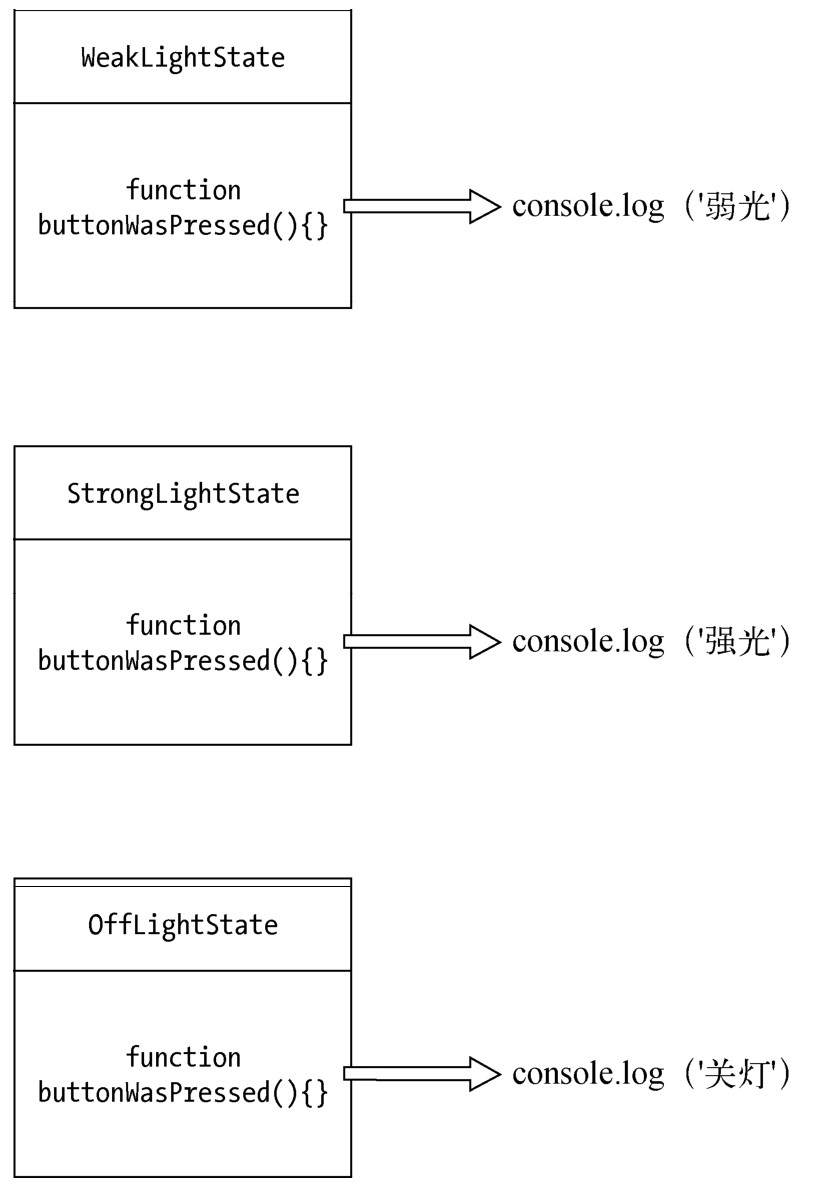
同时我们还可以把状态的切换规则都事先分布在状态类中,这样可以有效地减少条件分支语句。
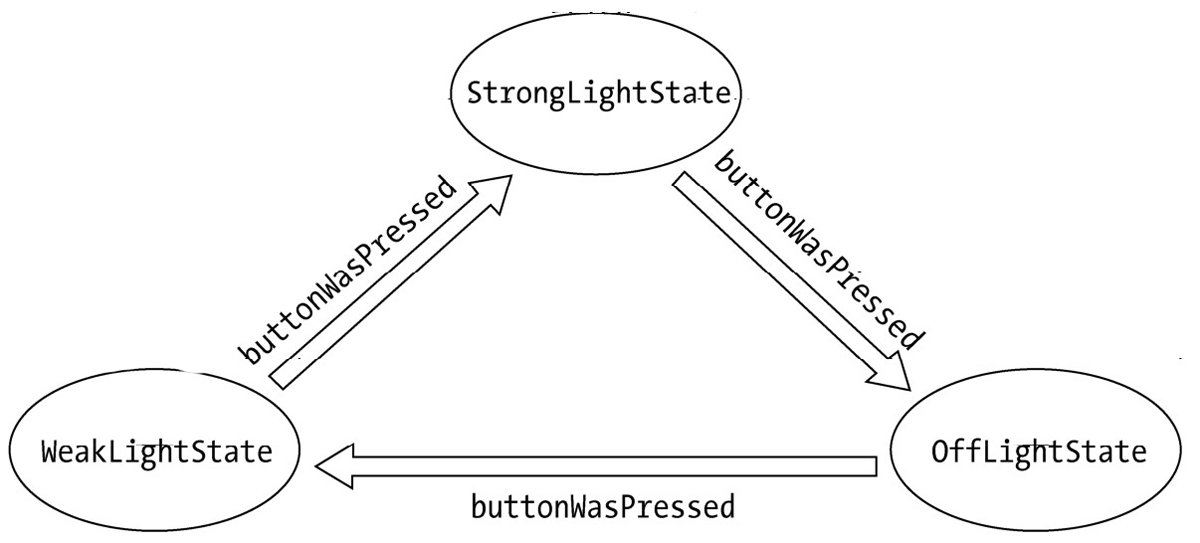
js1class offLightState {
2  constructor(light) {
3    this.light = light
4  }
5  buttonWasPressed() {
6    console.log('弱灯光')
7    this.light.setState(this.light.weakLightState)
8  }
9}
10class weakLightState {
11  constructor(light) {
12    this.light = light
13  }
14  buttonWasPressed() {
15    console.log('强灯光')
16    this.light.setState(this.light.strongLightState)
17  }
18}
19
20class strongLightState {
21  constructor(light) {
22    this.light = light
23  }
24  buttonWasPressed() {
25    console.log('关闭灯光')
26    this.light.setState(this.light.offLightState)
27  }
28}
接下来改写 Light 类,让其构造函数都可以创建一个状态对象,这样一来我们就可以很明显地看到电灯一共有多少种状态。
js1class Light {
2  constructor() {
3    this.offLightState = new offLightState(this)
4    this.weakLightState = new weakLightState(this)
5    this.strongLightState = new strongLightState(this)
6    this.button = null
7    this.currentState = null
8  }
9}
接着依然是 init 方法,创建一个 button,并且让自身保存这个 button 属性,最后给他绑定上点击后需要做的操作。
js1      class Light {
2        constructor() {
3        	...
4        }
5        init() {
6          const button = document.createElement("button");
7          const self = this;
8          button.innerHTML = "开关";
9          this.button = document.body.appendChild(button);
10          this.currentState = this.offLightState;
11          this.button.onclick = function () {
12            self.currentState.buttonWasPressed();
13          };
14        }
15      }
最后是 setState 方法。状态的切换规律被完好地定义在各个状态类中。在 Context 中再也不需要跟状态切换相关的条件分支。
js1      class Light {
2        constructor() {
3          ...
4        }
5        init() {
6          ...
7        }
8        setState(state) {
9          this.currentState = state;
10        }
11      }
现在我们的代码已经跟原来的效果一样了。在改造之后,我们将状态与行为局部化,这些行为被分散和封装在各自对应的状态类中,便于阅读和管理代码。
另外,状态之间的切换都分布在状态类的内部,这使得我们无需编写过多的条件分支来控制状态之间的转换。
如果现在我们需要再添加一种状态,我们只需要稍微修改一下代码就可以了。
添加状态
js1      class Light {
2        constructor() {
3          this.superLightState = new superLightState(this);
4          ...
5          }
6        }
修改 strongLightState 的 buttonWasPressed 方法中的 setState 的参数,使其下一次设置状态为超级灯光
js1      class strongLightState {
2      	...
3        buttonWasPressed() {
4          console.log("超级灯光");
5          this.light.setState(this.light.superLightState);
6        }
7      }
最后编写超级灯光类,使其切换到 offLightState 状态
js1class superLightState {
2  constructor() {
3    this.light = light
4  }
5  buttonWasPressed() {
6    console.log('关闭灯光')
7    this.light.setState(this.light.offLightState)
8  }
9}
现在我们的关系就是 offLightState ==> weakLightState ==> strongLightState ==> superLightState ==> offLightState
16.2 状态模式的定义
我们已经对状态模式有了一定的了解。状态模式具体的定义是这样的:
允许一个对象在其内部状态改变时改变它的行为,对象看起来似乎修改了它的类。
我们将这句话分成两个部分看。
- 第一个部分是将状态封装成独立的类,并将请求委托给当前的状态对象,当对象的内部状态改变时,会带来不同的行为变化。电灯的例子中,我们有几种状态,每次都会跟随着状态的不同而做不同的行为。
- 第二个部分是从客户的角度来看,我们使用的对象,在不同的状态中具有不同的行为,这个对象看起来是从不同的类中实例化而来的,实际上这是使用了委托的效果。
16.3 状态模式的通用结构
对于状态模式,我们首先要编写 Context(上下文)类,如上面例子中的 Light 类。随后在 Light 的构造函数中,我们要创建每一个状态类的实例对象,Context 将持有这些状态对象的引用,以便把请求委托给状态对象。用户的请求,即点击 button 的动作也是实现在 Context 中的。
js1class Light {
2  constructor() {
3    this.offLightState = new offLightState(this)
4    this.weakLightState = new weakLightState(this)
5    this.strongLightState = new strongLightState(this)
6    this.button = null
7    this.currentState = null
8  }
9  init() {
10    const button = document.createElement('button')
11    const self = this
12    button.innerHTML = '开关'
13    this.button = document.body.appendChild(button)
14    this.currentState = this.offLightState
15    this.button.onclick = function () {
16      self.currentState.buttonWasPressed()
17    }
18  }
19  //暴露出修改状态的方法
20  setState(state) {
21    this.currentState = state
22  }
23}
接下来就是写各种状态类,light 对象被传入状态类的构造函数,状态对象也必须拥有对 light 对象的引用,以便能调用 light 中的方法或者操控 light 对象。
js1class offLightState {
2  constructor(light) {
3    this.light = light
4  }
5  buttonWasPressed() {
6    console.log('弱灯光')
7    this.light.setState(this.light.weakLightState)
8  }
9}
10class weakLightState {
11  constructor(light) {
12    this.light = light
13  }
14  buttonWasPressed() {
15    console.log('强灯光')
16    this.light.setState(this.light.strongLightState)
17  }
18}
19class strongLightState {
20  constructor(light) {
21    this.light = light
22  }
23  buttonWasPressed() {
24    console.log('关灯')
25    this.light.setState(this.light.offLightState)
26  }
27}
16.8 状态模式和策略模式的关系
状态模式和策略模式像一对双胞胎,它们都封装了一系列的算法和行为,它们的类图看起来几乎一模一样,但是意图上有很大的不同,因此它们是两种迥然不同的模式。
策略模式和状态模式的共同点是,它们都有一个 context 类、一些策略或者状态类,上下文把请求委托给这些类来执行。
它们的区别是
- 策略模式中的各个策略类之间是平等又平行的,它们之间没有任何联系。所以客户必须熟知这些策略类的作用,以便用户可以随时切换算法。
- 状态模式中,状态和状态的行为是被封装好的,状态之间的切换也早已被规定完成,改变行为这件事情发生在状态模式的内部。对用户来说,并不需要知道这些细节。
16.9 javascript 版本的状态机
在上面的例子中,我们采用类的形式模拟面向对象语言的状态模式,我们首先为每种状态都定义了状态子类,然后在 context 中持有这些状态类对象的引用,以便把 currentState 设置为当前的状态对象。
状态模式是状态机的实现之一,但在 JavaScript 这种没有类的语言中,我们可以直接将状态对象写出来。此外,JavaScript 可以非常方便地使用委托技术,并不需要事先让一个对象持有另一个对象。
我们可以使用 Function.prototype.call 方法直接将请求委托给某个字面量对象来执行。
下面是代码
js1class Light {
2  constructor() {
3    this.currentState = FSM.offLightState
4  }
5  init() {
6    const button = document.createElement('button')
7    const self = this
8    button.innerHTML = '开关'
9    this.button = document.body.appendChild(button)
10    this.button.onclick = function () {
11      self.currentState.buttonWasPressed.call(self)
12    }
13  }
14  setState(state) {
15    this.currentState = state
16  }
17}
18const FSM = {
19  offLightState: {
20    buttonWasPressed() {
21      console.log('弱灯光')
22      this.setState(FSM.weakLightState)
23    },
24  },
25  weakLightState: {
26    buttonWasPressed() {
27      console.log('强灯光')
28      this.setState(FSM.strongLightState)
29    },
30  },
31  strongLightState: {
32    buttonWasPressed() {
33      console.log('关灯')
34      this.setState(FSM.offLightState)
35    },
36  },
37}
38
39const light = new Light()
40light.init()
16.11 实际项目中的其他状态机
在实际开发中,很多场景可以用状态机来模拟,比如一个下拉菜单在 hover 动作下有显示、悬浮、隐藏等状态。