 Oh-My-Note
例子
在线地址:https://codesandbox.io/p/github/18888628835/recoil-todo-list-with-test/main
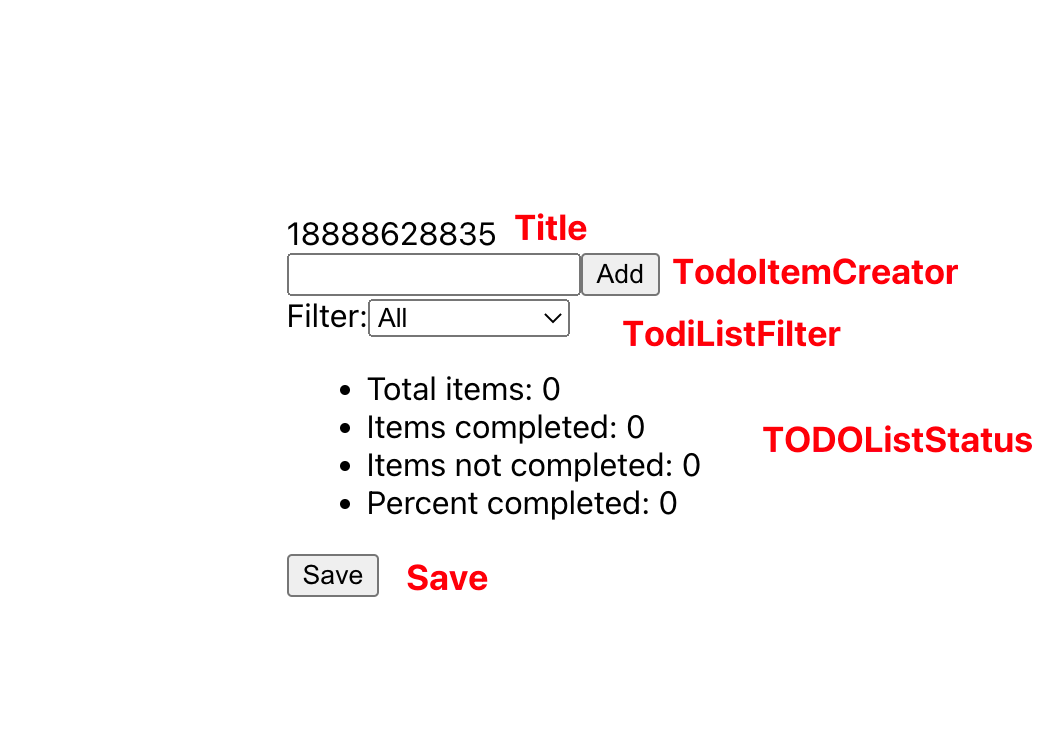
断言 input 能够输入
js1/*
2<input type="text" value={inputValue} onChange={onChange} />;
3*/
4it('input can be typed', () => {
5  render(<TodoItemCreator />)
6  const inputEl = screen.getByRole('textbox')
7  userEvent.type(inputEl, 'type some text ')
8  expect(inputEl.getAttribute('value')).toBe('type some text ')
9  userEvent.type(inputEl, 'continue')
10  expect(inputEl.getAttribute('value')).not.toBe('continue')
11  expect(screen.getByDisplayValue('type some text continue')).toBeInTheDocument()
12})
断言 select.option 正常渲染
js1/**
2  const options = [
3    { label: 'All', value: 'Show All' },
4    { label: 'Completed', value: 'Show Completed' },
5    { label: 'Uncompleted', value: 'Show Uncompleted' },
6  ];
7  <select>
8  {options.map(({ label, value }, index) => (
9    <option key={index} value={value} data-testid="select-option">
10      {label}
11    </option>
12  ))}
13</select>
14 */
15
16it('select options', () => {
17  render(<App />)
18  const options = screen.getAllByTestId('select-option')
19  expect(options[0].getAttribute('value')).toBe('Show All')
20  expect(options[1].getAttribute('value')).toBe('Show Completed')
21  expect(options[2].getAttribute('value')).toBe('Show Uncompleted')
22})
断言异步的 select.option 正常渲染
js1/**
2 useEffect(() => {
3    const dataFromDB = [
4      { label: 'All', value: 'Show All', disabled: false },
5      { label: 'Completed', value: 'Show Completed', disabled: false },
6      { label: 'Uncompleted', value: 'Show Uncompleted', disabled: true },
7    ];
8    Promise.resolve(dataFromDB).then((res) => setOptions([...res]));
9  }, []);
10 */
11it('async get select options', async () => {
12  render(<App />)
13  const options = await screen.findAllByTestId('select-option')
14  expect(options[0].getAttribute('value')).toBe('Show All')
15  expect(options[1].getAttribute('value')).toBe('Show Completed')
16  expect(options[2].getAttribute('value')).toBe('Show Uncompleted')
17})
断言 select.option 有默认值
js1it('default select-option', async () => {
2  render(<App />);
3  const options = await screen.findAllByTestId('select-option');
4  expect((options[0] as HTMLOptionElement).selected).toBeTruthy();
5  expect((options[1] as HTMLOptionElement).selected).toBeFalsy();
6  expect((options[2] as HTMLOptionElement).selected).toBeFalsy();
7});
断言 select.option 能被选择
js1it('select-option selected', async () => {
2  render(<App />);
3  const selectEl = await screen.findByRole('combobox');
4  const options = await screen.findAllByTestId('select-option');
5  userEvent.selectOptions(selectEl, options[1]);
6  expect((options[0] as HTMLOptionElement).selected).toBeFalsy();
7  expect((options[1] as HTMLOptionElement).selected).toBeTruthy();
8  expect((options[2] as HTMLOptionElement).selected).toBeFalsy();
9});
断言 select.option 不能被选择
js1it('one select-option is disabled', async () => {
2  render(<App />)
3  const options = await screen.findAllByTestId('select-option')
4  // The following code will report an error
5  // userEvent.selectOptions(selectEl, options[3]);
6  expect(options[2]).toBeDisabled()
7})
断言 UL-list 正常渲染
js1/**
2    <ul>
3      <li>Total items: {totalNum}</li>
4      <li>Items completed: {totalCompletedNum}</li>
5      <li>Items not completed: {totalUncompletedNum}</li>
6      <li>Percent completed: {formattedPercentCompleted}</li>
7    </ul>
8 */
9it('should render list of 4 list-items', async () => {
10  render(<App />)
11  await waitFor(() => {
12    const list = screen.getByRole('list')
13    const { getAllByRole } = within(list)
14    const items = getAllByRole('listitem')
15    expect(items.length).toBe(4)
16  })
17})
断言匹配 snapshot
js1it('match snapshot', async () => {
2  const { asFragment } = render(<App />)
3  await screen.findAllByTestId('select-option')
4  expect(asFragment()).toMatchSnapshot()
5})
由于例子中的 select-option 是异步获取的,如果不写 await ...则会报act(...)
断言能够增加一行
js1it('add Item', async () => {
2  render(<App />)
3  const inputEl = screen.getByRole('textbox')
4  const buttonEl = screen.getByRole('button', { name: /add/i })
5  userEvent.type(inputEl, 'item1')
6  userEvent.click(buttonEl)
7  await act(async () => Promise.resolve())
8  expect(await screen.findByDisplayValue('item1')).toBeInTheDocument()
9  expect(screen.queryByDisplayValue('item2')).toBeNull()
10  expect(screen.queryByDisplayValue('item3')).not.toBeInTheDocument()
11})
同样的原因:await act(async () => Promise.resolve())为了解决异步获取 select-option导致的 TLR报的 warning
断言能够删除一行
js1it('delete Item', async () => {
2  render(<App />)
3  const inputEl = screen.getByRole('textbox')
4  const buttonEl = screen.getByRole('button', { name: /add/i })
5  userEvent.type(inputEl, 'item1')
6  userEvent.click(buttonEl)
7  await act(() => Promise.resolve())
8  const todoItem = screen.getByTestId('todo-item-0')
9  const { findByRole } = within(todoItem)
10  const deleteEl = await findByRole('button', { name: /x/i })
11  userEvent.click(deleteEl)
12  expect(screen.queryByDisplayValue('item1')).toBeNull()
13  // expect(await screen.findByDisplayValue('item1')).toBeInTheDocument();
14})
测试 Recoil-state
首先需要利用 RecoilObserver 来监听 Recoil 数据
js1// @ts-ignore
2const RecoilObserver = ({ state, onChange }) => {
3  const value = useRecoilValue(state)
4  useEffect(() => onChange(value), [onChange, value])
5  return null
6}
state 增加和删除
js1it('be change when user click add button and x button', async () => {
2  const onChange = jest.fn()
3  render(
4    <RecoilRoot>
5      <RecoilObserver state={todoListState} onChange={onChange} />
6      <TodoList />
7    </RecoilRoot>,
8  )
9  const inputEl = await screen.findByRole('textbox')
10  const buttonEl = await screen.findByRole('button', { name: /add/i })
11  // the following code will report error: act(...)
12  //const inputEl = screen.getByRole('textbox');
13  //const buttonEl = screen.getByRole('button', { name: /add/i });
14  userEvent.type(inputEl, 'item1')
15  userEvent.click(buttonEl)
16  expect(onChange).toHaveBeenCalledTimes(2)
17  expect(onChange).toHaveBeenCalledWith([])
18  expect(onChange).toHaveBeenCalledWith([{ id: expect.any(Number), isComplete: false, text: 'item1' }])
19
20  const todoItem = screen.getByTestId('todo-item-0')
21  const { findByRole } = within(todoItem)
22  const deleteEl = await findByRole('button', { name: /x/i })
23  userEvent.click(deleteEl)
24  expect(onChange).toHaveBeenCalledWith([])
25})
state 异步查询
js1  it('async get data from backend', async () => {
2    const mockState = { login: 'test title' };
3    global.fetch = jest.fn(() =>
4      Promise.resolve({
5        json: () => Promise.resolve(mockState),
6      })
7    ) as jest.Mock;
8
9    render(
10      <RecoilRoot>
11        <Title />
12      </RecoilRoot>
13    );
14    expect(await screen.findByText(mockState.login)).toBeInTheDocument();
15  });
保存数据到数据库
js1  it('save data', async () => {
2    global.fetch = jest.fn() as jest.Mock;
3    render(
4      <RecoilRoot>
5        <Save />
6      </RecoilRoot>
7    );
8    const buttonEl = screen.getByRole('button', { name: /Save/i });
9    userEvent.click(buttonEl);
10    expect(global.fetch).toBeCalledTimes(1);
11  });