 Oh-My-Note
八、元素大小和滚动
本节介绍 JavaScript 中有关元素的宽度、高度和其他信息。
示例元素:
html1<style>
2  #example {
3    width: 300px;
4    height: 200px;
5    border: 25px solid #e8c48f;
6    padding: 20px;
7    overflow: auto;
8  }
9</style>
10<div id="example">
11  <h3>Introduction</h3>
12  <p>
13    This Ecma Standard is based on several originating technologies, the most well known being JavaScript (Netscape) and
14    JScript (Microsoft). The language was invented by Brendan Eich at Netscape and first appeared in that company's
15    Navigator 2.0 browser. It has appeared in all subsequent browsers from Netscape and in all browsers from Microsoft
16    starting with Internet Explorer 3.0. The development of this Standard started in November 1996. The first edition of
17    this Ecma Standard was adopted by the Ecma General Assembly of June 1997.
18  </p>
19
20  <p>
21    That Ecma Standard was submitted to ISO/IEC JTC 1 for adoption under the fast-track procedure, and approved as
22    international standard ISO/IEC 16262, in April 1998. The Ecma General Assembly of June 1998 approved the second
23    edition of ECMA-262 to keep it fully aligned with ISO/IEC 16262. Changes between the first and the second edition
24    are editorial in nature.
25  </p>
26
27  <p>
28    The third edition of the Standard introduced powerful regular expressions, better string handling, new control
29    statements, try/catch exception handling, tighter definition of errors, formatting for numeric output and minor
30    changes in anticipation of forthcoming internationalisation facilities and future language growth. The third edition
31    of the ECMAScript standard was adopted by the Ecma General Assembly of December 1999 and published as ISO/IEC
32    16262:2002 in June 2002.
33  </p>
34</div>
这个示例元素包含 border、padding、scrolling 等属性,但是不包含 margin,因为它并不是元素的一部分。
这个元素的示例图是这样的:
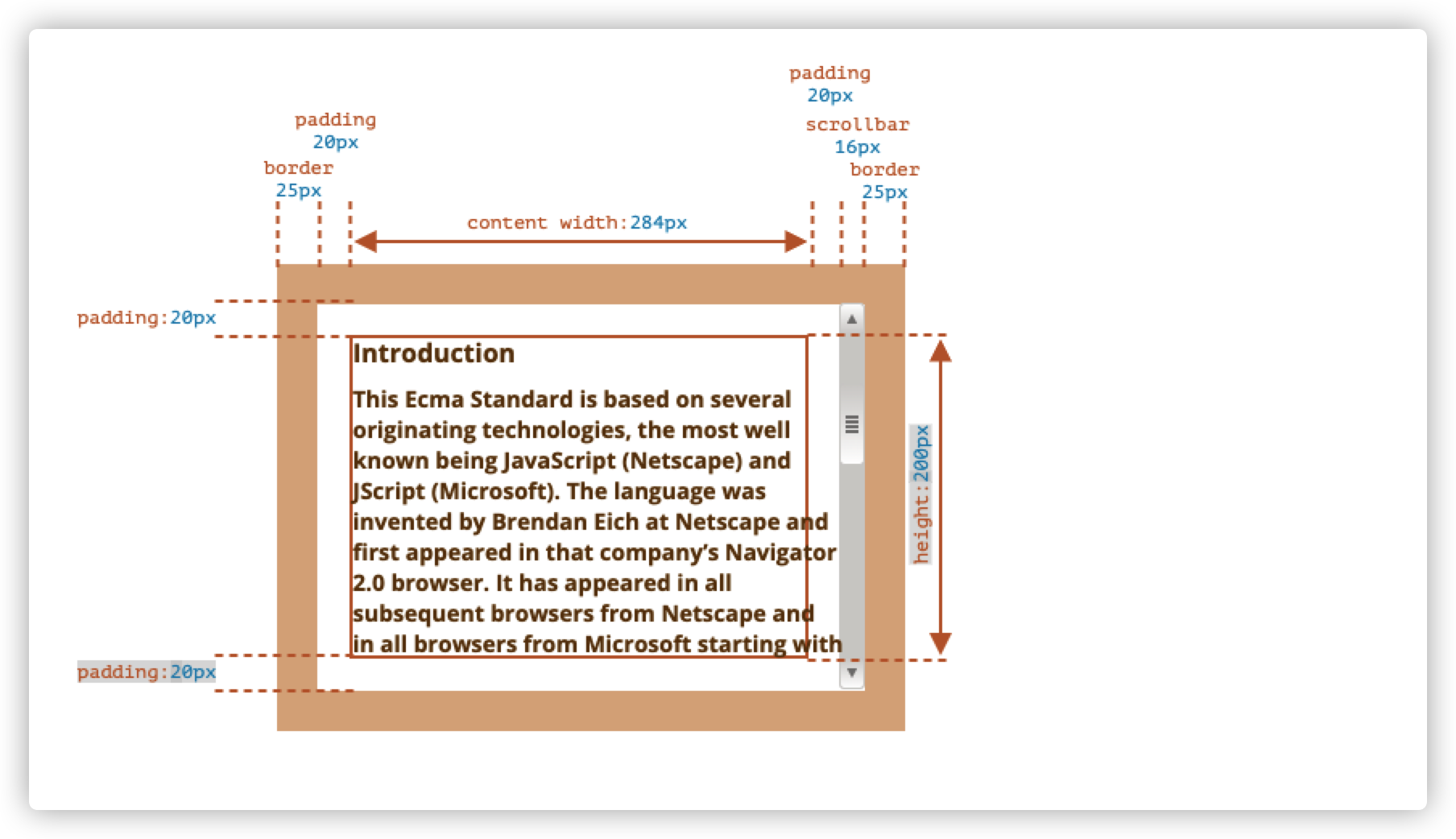
这个元素是具有滚动条的。一些浏览器通过从内容(content-width)中获取空间来给滚动条保留空间。
因此,如果没有滚动条,内容宽度将是 300px,但如果滚动条为 16px,那么还剩下 284px。我们应该考虑滚动条的因素。
8.1 几何
对应于上面的标记 css 属性的图片,以下是一个带有元素几何属性的图片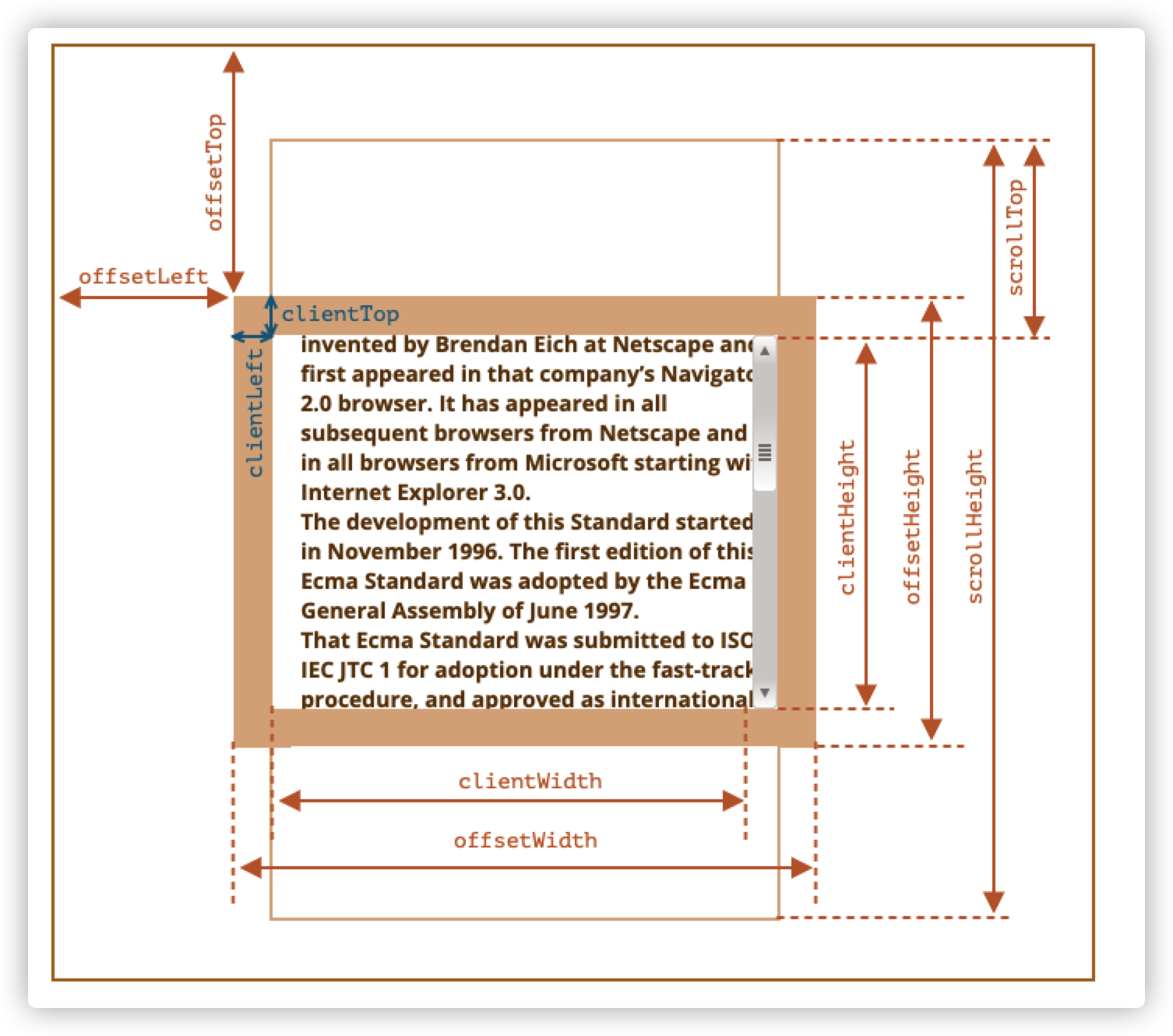
这些属性的值是数字类型,它们是像素测量值。
下面我们介绍这些元素的几何属性
8.2 offsetParent,offsetLeft/offsetTop
这些是元素最外层的属性:
offsetParent 是最接近的祖先,在浏览器渲染时,它们被用于计算坐标。
最近的祖先是下列之一:
- css 定位的祖先(position 为 absolute、relative 或者 fixed)
<td>,<th>,<table><body>
offsetLeft/offsetTop 则提供相对于 offsetParent 左上角的 x/y 坐标。
比如下面例子中,div 有 main 作为 offsetParent,并且offsetLeft/offsetTop是它距离左上角的位移。
html1<main style="position: relative;" id="main">
2  <article>
3    <div id="example" style="position: absolute; left: 180px; top: 150px;">...</div>
4  </article>
5</main>
6<script>
7  console.log(example.offsetParent) // main节点
8  console.log(example.offsetTop) // 150 注意:这是一个数字,不是字符串 "180px"
9  console.log(example.offsetLeft) // 180
10</script>
有几种情况下,offsetParent 可能是 null
- 未显示的元素(display 为 none 或者不在文档中)
- body 和 html
position:fixed的元素
8.2 offsetWidth/Height
这两个属性是最简单的,它们提供元素的“外部”宽高。也就是说,它提供了元素的完整大小。
offsetWidth = 元素的 width + paddingLeft/Right + borderLeft/Right
offsetHeight = 元素的 height + paddingTop/Bottom + boderTop/Bottom
以下是示例元素的解析图
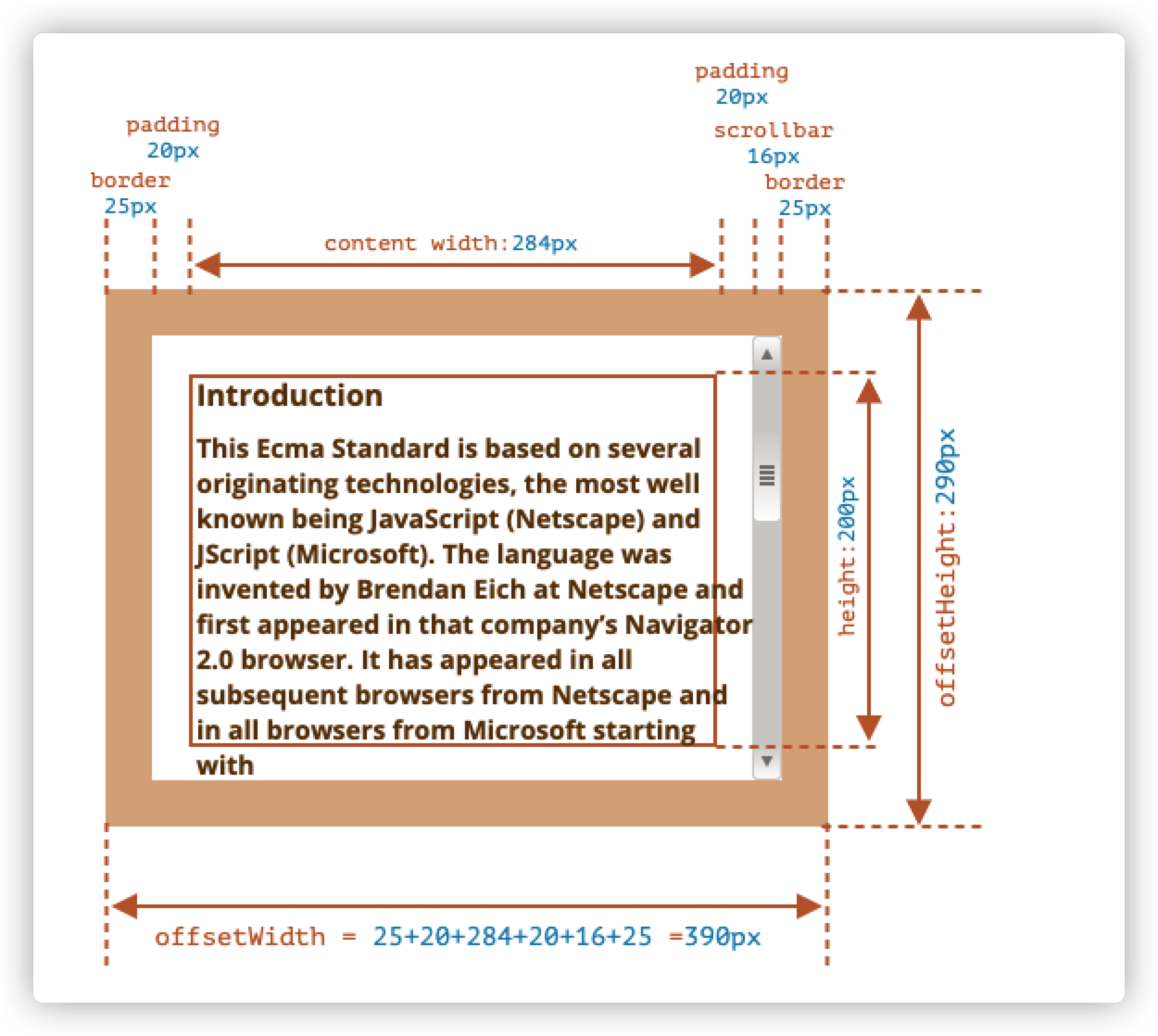
仅针对显示的元素计算几何属性,对于未显示的元素,几何属性为 0/null。
如果一个元素(或者其祖先)具有display:none或者不在文档中,则所有几何属性为 0。(或offsetParent为null)
8.3 clientTop/Left
在元素内部,我们有边框(border)。
为了测量它们,可以使用 clientTop/Left。
在例子中,我们的元素的 border 为 25px。那么 clientTop/Left 均为 25px
clientTop—— 上边框高度clientLeft—— 左边框宽度
准确的说,这些属性不是边框的 width/height,而是元素内侧和元素外侧的相对坐标。
当操作系统为阿拉伯语或希伯来语时,此时浏览器将滚动条设置在右边,而不是在左边,此时clientLeft就包含了滚动条的宽度。
在这种情况下,clientLeft 就是25+16 = 41
8.4 clientWidth/Height
这两个属性提供元素边框区域内的大小。
它们包括了content width和padding,但不包括滚动条宽度。
在示例元素中,我们的元素的边框区域内大小是这样的:
clientHeight:content height+paddingTop+paddingBottom=200+20+20clientWidth:content width+paddingLeft+paddingRight=284+20+20
这里的content width并不是300px,而是去除滚动条 16px 后的 284
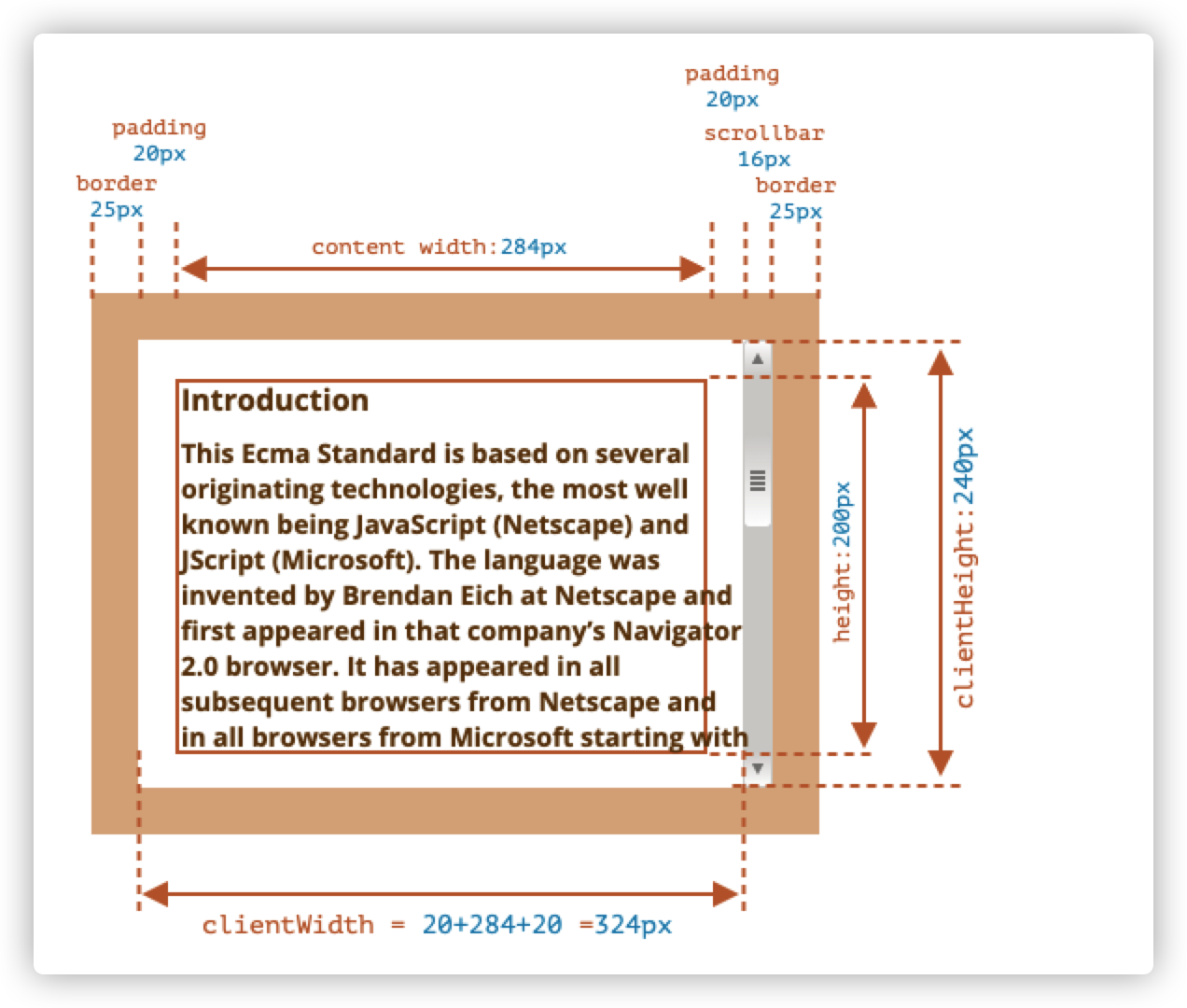
如果这里没有 padding,那么 clientWidth/Height 代表的就是内容区域,即 border 和 scrollbar(如果有)内的区域。
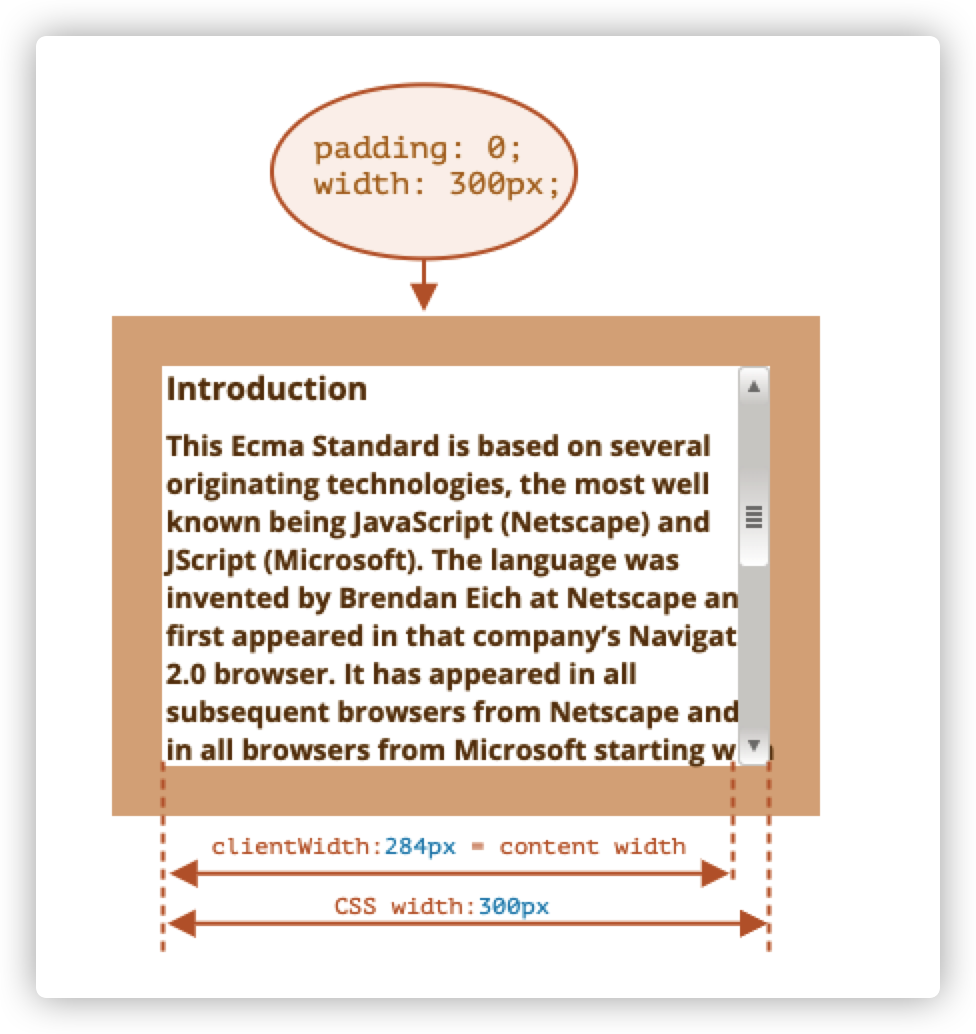
因此,当没有 padding 时,我们可以直接使用clientWidth/Height来获取内容区域的大小。
8.5 scrollWidth/Height
这个属性跟clientWidth/Height差不多,区别是它们还包括滚动超出的部分。
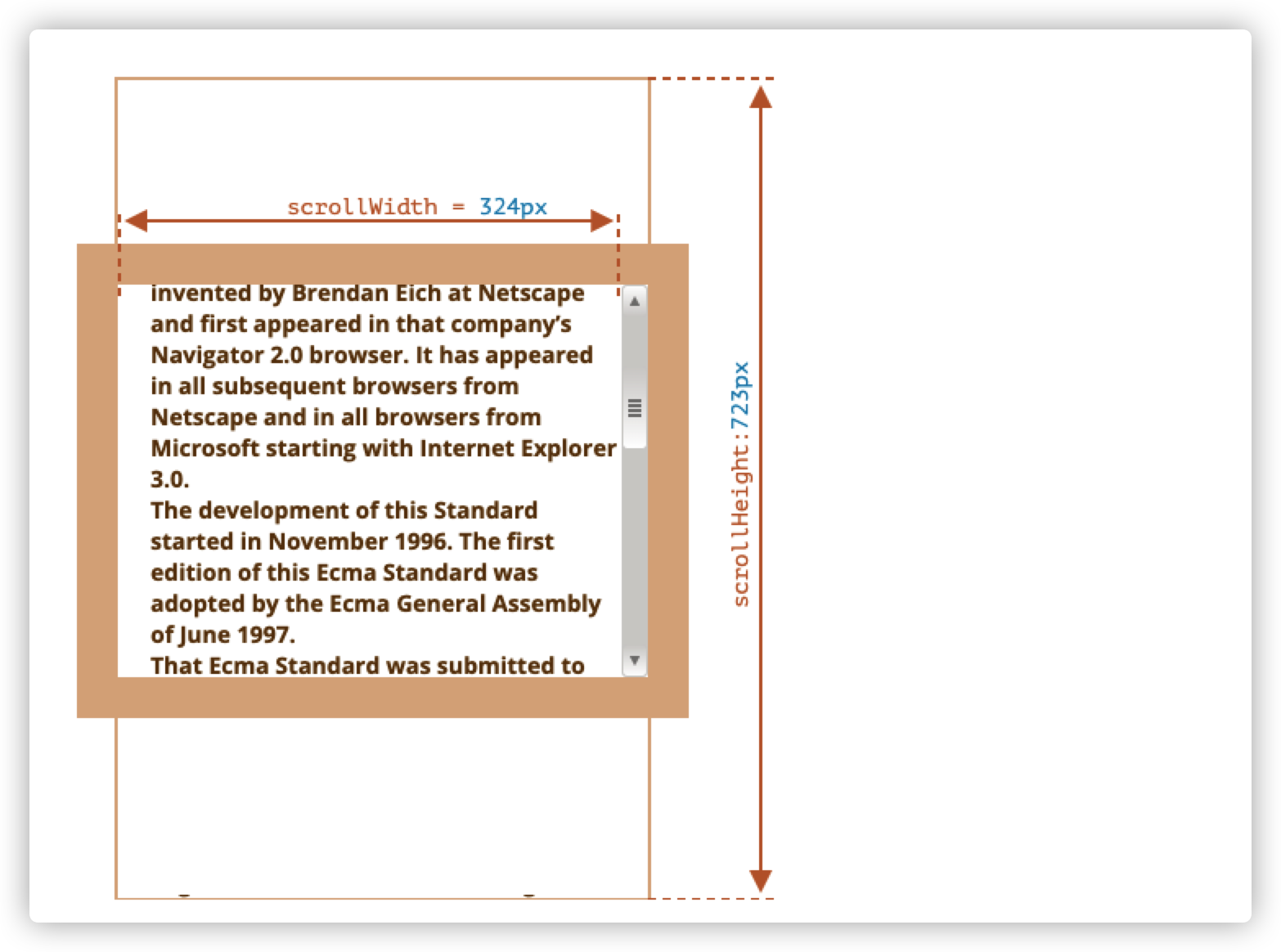
在上图中,包含 padding 的元素 clientWidth 跟 scrollWidth 是一样的。
但 clientHeight 跟是 scrollHeight 不一样,scrollHeight 是内容区域的完整内部高度,包括滚出的部分。
因此:
scrollHeight = 723— 是内容区域的完整内部高度,包括滚动出的部分。scrollWidth = 324— 是完整的内部宽度,这里我们没有水平滚动,因此它等于clientWidth。
我们可以使用这个特点来讲元素展开(expand)到整个 width/height。
javascript1// 将元素展开(expand)到完整的内容高度
2element.style.height = `${element.scrollHeight}px`
8.6 scrollLeft/scrollTop
属性scrollLeft/scrollTop是元素隐藏的、滚动部分的width/height
在下图中,我们可以看到带有垂直滚动块的scrollHeight和scrollTop
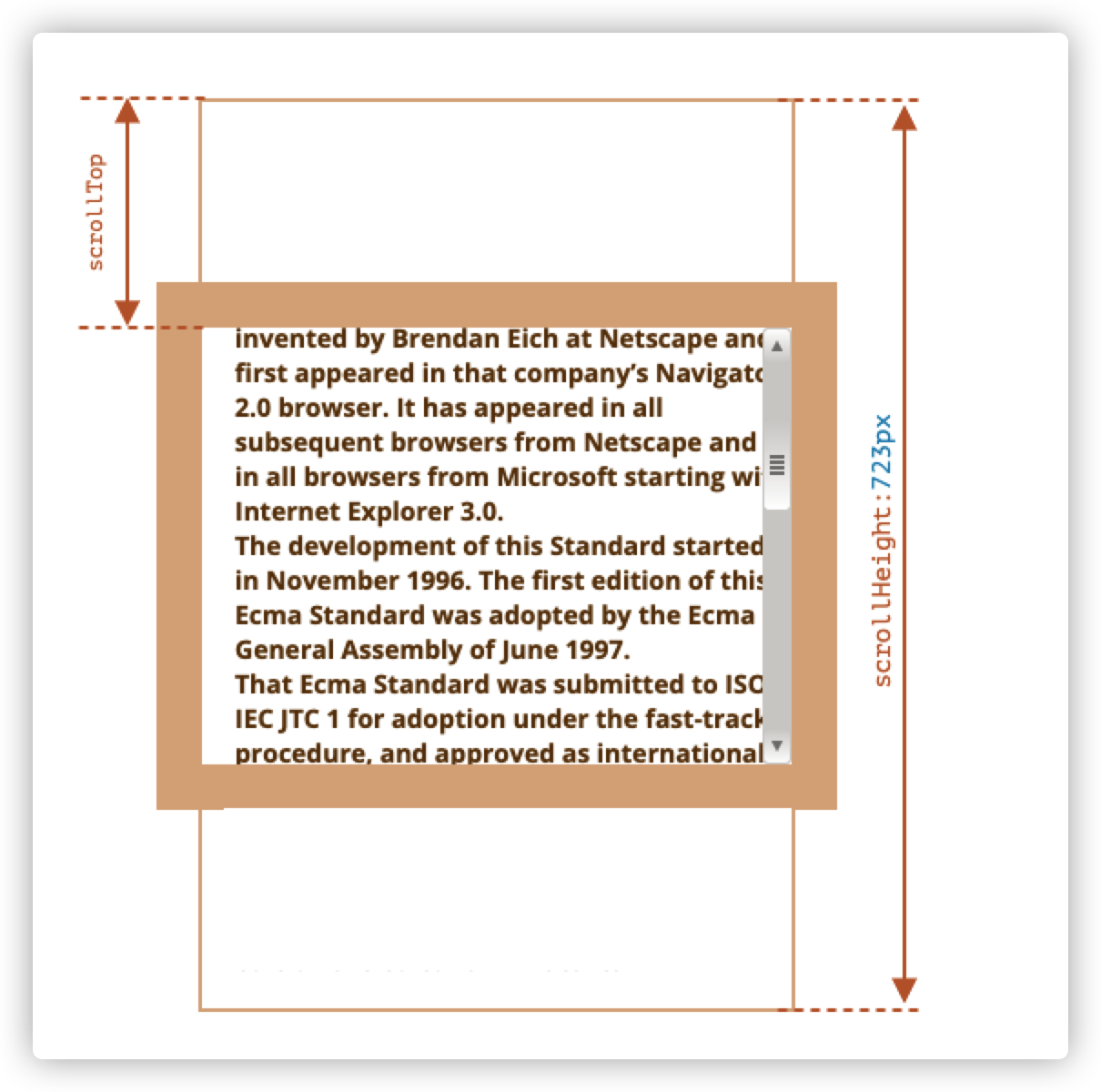
也就是说,scrollTop就是已经滚动了多少的意思。
大多数的几何属性是可读的,但是 scrollTop/Left 是可修改的,浏览器会滚动该元素。
将 scrollTop 设置成 0 或者一个大的值,将会使元素滚动到顶部/底部
8.7 不要从 css 中获取 width/height
DOM 的几何元素用于获取宽度、高度和计算距离。
为什么我们不用getComputedstyle来读取 css 的 width 和 height 呢?
这里有三个原因:
-
css 的 width/height 受
box-sizing影响,同样拥有 300px 的 width 的元素,在不同的 box-sizing 下在浏览器的渲染效果是不同的。如果用 css 修改了box-sizing则会影响 JavaScript 代码。html1<style> 2 .div { 3 width: 300px; 4 height: 200px; 5 border: 25px solid #e8c48f; 6 padding: 20px; 7 } 8 .div2 { 9 box-sizing: border-box; 10 } 11</style> 12<div class="div"></div> 13<div class="div div2"></div> 14 15<script> 16 const div1 = document.body.querySelector('.div') 17 const div2 = document.body.querySelector('.div2') 18 console.log(getComputedStyle(div1).width) // 300px 19 console.log(getComputedStyle(div2).width) // 300px 20 console.log(div1.offsetWidth) // 390 21 console.log(div2.offsetWidth) // 300 22</script>上面的代码中,div1 和 div2 只有
box-sizing不同,但是用getComputedStyle取到的是一样的,只有用几何属性才能取到正确的值。 -
其次,CSS 的
width/height可能是auto,例如内联(inline)元素html1<span id="elem">Hello!</span> 2 3<script> 4 alert(getComputedStyle(elem).width) // auto 5</script> -
滚动条,如果一个元素有滚动条,那它就会占用内容的空间。因此,可用于内容的实际宽度小于 css 宽度。
使用
getComputedStyle(elem).width时,某些浏览器返回的是实际内部宽度减去滚动条宽度,而有些浏览器是返回 css 宽度,忽略了滚动条。在这样的差异下,我们不能使用getComputedStyle来获取元素的宽高。
8.8 小结
元素具有以下几何属性:
-
offsetParent是离元素最接近的 css 定位的祖先,或者是td,th,table,body。 -
offsetLeft/Top是相对于offsetParent的左上角的坐标 -
offsetWidht/Height是元素外部的宽和高,包括了边框。 -
clientTop/Left是元素左上角外角到左上角内角的距离。对于从左到右显示内容的操作系统来说,它们始终是左侧/顶部 border 的宽度。而对于从右到左显示内容的操作系统来说,垂直滚动条在左边,所以clientLeft也包括滚动条的宽度。 -
clientWidth/Height是元素内部的宽高,不包括边框,不包括滚动条,包括 content width 和 padding。 -
scrollWidth/Height是元素内部的宽高,跟clientWidth/Height是一样的,但是它还包括元素滚动出的不可见的部分。 -
scrollLeft/Top是从元素左上角开始,滚动出元素上半部分的宽高。简单来说就是滚动了多少。
除了scrollLeft/scrollTop外,其他几何属性都是只读的。